How to Choose a Label Printing Machine: 6 Key Decisions for Industrial Buyers
If you're looking for a desktop label maker for your office, this guide isn't for you.
This guide is written for factory owners, label converters, and packaging manufacturers who are evaluating industrial roll-to-roll label printing machines — equipment designed to run thousands of meters of label stock, produce consistent multicolor output, and integrate with downstream finishing processes like die cutting, lamination, and slitting.
Making this purchase correctly matters. A label printing machine is a capital investment you'll operate for a decade or more. Buy the wrong configuration and you'll either cap your production capabilities, overpay for features you never use, or discover too late that the machine can't handle the materials your customers actually need.
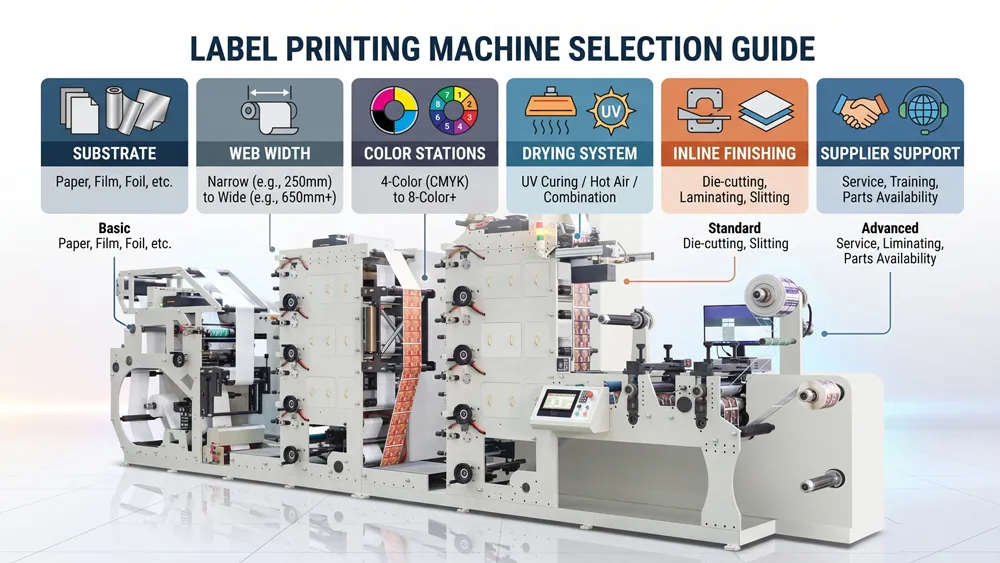
This guide walks you through six decisions that determine which machine is right for your operation. Work through them in order — each one narrows the field and makes the next decision easier.
For a complete overview of available machine types and configurations, see our label printing machine product page.
Before You Start: Clarify What Kind of Operation You're Running
The right machine for a label converter producing 50 million self-adhesive labels per month looks very different from the right machine for a food manufacturer bringing label production in-house for the first time.
Before evaluating any specifications, place yourself in one of three categories:
Expanding an existing label printing operation. You already know what you print, at what speed, and on what materials. Your decision is mostly about adding capacity or upgrading capability — a faster machine, more color stations, or the addition of inline die cutting you currently handle separately.
Converting from outsourced to in-house production. You've been buying finished labels from a supplier and want to take control of that process. You'll need to think carefully about your full material and design range, not just today's top-selling SKUs.
Entering the label printing business. You're building a label converting operation from scratch. You have the most flexibility — and the highest risk of under-specifying or over-specifying. Getting the configuration right the first time is especially important.
Regardless of which category you're in, the six decisions below apply. The difference is how much certainty you have about your answers.
Decision 1: What Label Material Will You Print On?
Material is the single most important factor in selecting a label printing machine. It determines your drying system, your ink type, your tension control requirements, and whether you need surface treatment like corona processing. Everything else flows from this decision.
The most common label substrates and their machine implications:
Self-adhesive paper labels are the most common starting point. Standard coated or uncoated paper labels are relatively forgiving — they work with water-based inks, tolerate IR drying systems, and don't require special surface treatment. If your entire production is paper-based, your machine requirements are straightforward.
BOPP (Biaxially Oriented Polypropylene) film labels are widely used for food and beverage, household goods, and any application requiring moisture resistance. BOPP has a low surface energy, which means ink doesn't naturally adhere well to it. You'll need a corona treatment unit to raise the surface energy before printing, and UV curing to set the ink properly after. This adds meaningful cost to the machine configuration — but skipping it means poor adhesion and failed labels.
PET (polyester) film labels are used where durability, heat resistance, or chemical resistance matters — pharmaceutical, industrial, and premium cosmetic applications are common examples. PET is dimensionally stable but has tight tension requirements. At higher speeds or with imprecise tension control, PET can track unevenly across the web, causing registration problems. A machine with closed-loop servo tension control is strongly recommended.
PVC labels require specific ink compatibility and careful solvent management. They're used for shrink sleeves and some industrial applications. If PVC is part of your material mix, verify ink system compatibility before purchasing any machine.
Thermal label stock is temperature-sensitive. The heat-sensitive coating that makes it work for barcode printing can be damaged by excessive drying temperatures. If you print on thermal stock, your drying system needs to be carefully controlled — or you'll destroy the label's functionality in the process of printing it.
If your production involves more than one substrate type, design your machine around the most demanding material in your mix. A machine configured for BOPP and PET can handle paper without issue. A machine configured only for paper cannot easily handle film.
Decision 2: What Web Width Do You Need?
Web width determines the maximum label size you can produce and, indirectly, how many labels you can print across the web in a single pass — which has a direct impact on your output per hour.
Common printing widths and their typical applications:
- Up to 320mm — narrow-format label work: small self-adhesive labels, specialty applications, wristbands
- 330–430mm — the most common range for label converters producing standard product labels for food, beverage, cosmetics, and logistics
- 480–550mm — wider product labels, in-mold labels (IML), and industrial roll label applications
- 600mm and above — high-output production environments, wide-format industrial labels
A practical rule for choosing web width: identify the widest label in your current (or planned) product range, then add 15–20% as a buffer for future flexibility. Buying a 320mm machine when your widest label is 310mm leaves you no room for a slightly wider customer request.
One consideration that buyers often overlook: web width affects your machine's physical footprint and its base cost. A wider machine is a larger machine — both in floor space and in price. Don't select more width than your actual production requires.
Decision 3: How Many Color Stations Do You Need?
Color station count is typically the largest single driver of machine cost after web width. Each additional printing station adds mechanical components — an anilox roller, doctor blade, ink tray, impression cylinder, and servo motor — and the associated cost.
Here's a practical framework for matching color stations to your production:
2-color configurations are appropriate for simple applications: single-color labels with a spot second color, basic logistics labels, thermal label stock with minimal design requirements. The economics are favorable, but the creative range is limited.
4-color configurations are the most common choice for label converters running standard product labels. Four stations allow full CMYK process printing — enough to reproduce photographs, complex graphics, and full-color brand designs. For most operations entering the label business, 4 colors is the right starting point.
6-color configurations add flexibility beyond CMYK. Extra stations are used for Pantone spot colors (allowing precise brand color matching that CMYK can't reliably achieve), specialty coatings like matte or gloss varnish, or effects like cold foil preparation. Premium food labels, cosmetic labels, and health and beauty products frequently require 6 colors.
8-color and above serves high-end label applications: luxury goods packaging, extended color gamut printing, labels with multiple special effects, or production environments where minimizing color deviation across long runs is critical.
The key principle: don't buy significantly more color stations than your current business requires, but think carefully about where your business will be in three to five years. Adding a color station later is not impossible, but it's far less efficient than specifying correctly the first time. If 20–30% of your anticipated work requires 6-color capability, the premium for 6 stations typically pays back within 12–18 months of operation.
Decision 4: UV Drying, IR Drying, or Hot Air? Choosing Your Drying System
The drying system is where many buyers make costly mistakes — either overspending on UV capability they don't need, or under-specifying and finding their machine can't handle the materials their customers actually need.
UV (ultraviolet) curing systems expose UV-reactive inks to ultraviolet light, causing them to cure almost instantly. UV curing is fast, effective on non-absorbent substrates like BOPP and PET film, and produces ink layers that are highly resistant to abrasion, chemicals, and moisture. The tradeoffs are cost: UV lamps, power supplies, and UV-specific inks all add to both capital and operating expense. UV inks cost approximately two to three times more per kilogram than water-based alternatives.
IR (infrared) drying systems use radiant heat to evaporate water from water-based inks, leaving the colorant behind. IR drying works well for paper substrates and water-based ink systems. It's less expensive than UV and sufficient for most paper label applications. IR drying is not suitable for film substrates, where water-based inks won't adhere properly regardless of drying method.
Hot air drying is the most economical option and is appropriate for straightforward water-based printing on absorbent paper substrates at moderate speeds. It's rarely sufficient for film materials and can limit your maximum production speed.
The decision rule is straightforward: if your production involves film substrates (BOPP, PET, PVC), UV curing is not optional — it's required. If your production is limited to paper-based substrates, IR drying is sufficient and more cost-effective. If you plan to print both paper and film materials, configure for UV — it handles paper applications without issue, while IR cannot handle film.
Decision 5: Do You Need Inline Die Cutting and Finishing?
A basic label printing machine prints and rewinds. An inline finishing configuration prints, cuts labels to shape, and delivers finished label rolls in a single continuous pass. The choice between these approaches is one of the most significant configuration decisions you'll make — and it's driven by your workflow, not just your budget.
The case for inline die cutting:
When printing and cutting happen in sequence on the same machine, you eliminate the need to queue jobs through a separate die cutter, manage material transfers between machines, and coordinate throughput speeds. For label converters running high-volume production with frequent job changeovers, the productivity gain from an inline workflow is substantial. Setup time drops because you're configuring one machine instead of two. Floor space requirements are lower than two separate machines in series.
The case for a standalone die cutter:
If your printing runs are long but your die cutting patterns change infrequently, the flexibility of a dedicated die cutter may not be worth the inline premium. Operations that already own capable die cutting equipment, or that run very long same-design production runs, often find better economics in keeping the two processes separate. There's also a maintenance argument: when one machine requires service, an inline configuration takes both processes offline simultaneously. Separate machines allow either process to continue while the other is being serviced.
Other inline finishing options to consider:
Beyond die cutting, label printing machines can be configured with inline lamination (applying a protective film coating), cold stamping (adding metallic foil effects without heat), slitting (dividing a wide web into multiple narrow rolls), and rewinding units. Each adds capability and cost. The right combination depends on the specific label products you're producing.
Henghao's label printing machines can be configured with optional inline die cutting, lamination, slitting, and rewinding units — your exact workflow needs determine the right combination.
Decision 6: What Happens After You Buy? Evaluating Manufacturer Support
A label printing machine with excellent specifications and poor manufacturer support is a bad purchase. Production equipment will require installation, commissioning, operator training, periodic maintenance, and eventually spare parts. The quality of support you receive at each of these stages determines whether your investment pays off smoothly or becomes a recurring source of downtime and frustration.
Before finalizing any purchasing decision, get clear answers to these questions:
Installation and commissioning: Does the manufacturer include on-site installation in the price? How many days does commissioning typically take? Will they certify that the machine meets its stated registration accuracy and speed before they leave?
Operator training: Will technicians train your operators on-site? For how many days? Is training documentation available in your language? Initial operator competency has a significant impact on the time to reach stable production.
Spare parts and consumables: Which components wear and need replacement? (Anilox rollers, doctor blades, UV lamps, and impression cylinder bearings are typical examples.) How are spare parts ordered and shipped? What is the typical lead time to your location? Experienced buyers often request that a starter spare parts kit be included with the machine purchase.
Remote support: Can the manufacturer diagnose machine issues remotely — by video call, machine monitoring software, or both? A fast response to a critical problem can mean the difference between a two-hour fix and a two-day production halt.
References: Can the manufacturer connect you with other buyers in your country or region who have purchased the same machine? Speaking with an existing operator is more informative than any specification sheet.
Support quality is harder to evaluate than machine specifications, but it matters more over the life of the equipment. A manufacturer with strong technical support and responsive communication is worth paying more for.
Putting It All Together: A Simple Decision Framework
Running through the six decisions above for your specific situation gives you a configuration brief you can use to compare quotes accurately. Here's how the most common buyer profiles map to machine configurations:
| Decision Point | Entry-Level Paper Labels | Standard Mixed Production | Film and Premium Labels |
|---|---|---|---|
| Primary material | Self-adhesive paper | Paper + BOPP | BOPP / PET film |
| Recommended web width | Up to 320mm | 420mm | 480mm+ |
| Color stations | 2–4 | 4–6 | 6–8 |
| Drying system | IR | UV recommended | UV required |
| Inline die cutting | Optional | Recommended | Recommended |
| Corona treatment | Not required | Required for film | Required |
Use this table as a starting point, not a final answer. Your actual configuration may differ based on production volume, label complexity, floor space constraints, and budget.
Frequently Asked Questions
What is the difference between a label printing machine and a label maker?
A label maker (such as Dymo or Brother) is a compact desktop device designed for printing small quantities of simple labels in an office or home setting. A label printing machine refers to industrial roll-to-roll equipment designed for high-volume production of product labels, with configurable color stations, drying systems, inline finishing options, and production speeds measured in meters per minute rather than labels per hour.
How do I know what web width to choose for my label printing machine?
Start with the widest label size you currently produce — or the widest size you expect to produce within the next three years — and add 15–20% as a buffer. For most label converters producing standard product labels, a 420mm printing width covers the majority of jobs. If you produce IML labels, wide-format industrial labels, or plan to gang-print multiple narrow labels across the web simultaneously, 480mm or wider may be the better choice.
Do I need UV drying on my label printing machine?
UV drying is required if you plan to print on film substrates like BOPP or PET, which cannot absorb water-based inks. If your production is limited to self-adhesive paper or thermal label stock, IR drying is sufficient and more cost-effective. If there is any possibility that your material mix will include film substrates in the future, configuring for UV from the start is the more flexible choice.
How many color stations do most label converters use?
Four-color configurations are the most common starting point for label converters producing standard product labels, as they allow full CMYK process printing. Six-color machines are chosen when Pantone spot color accuracy or specialty finishes are required. Eight-color machines serve premium and luxury label applications. Two-color configurations are appropriate for simple industrial or logistics labeling where color requirements are minimal.
Next Steps
Working through these six decisions should give you a clear picture of the machine configuration your operation actually needs. The next step is to request a quote based on your specific requirements — material type, web width, number of color stations, drying system, and any inline finishing units you've identified.
You can view our full range of configurable label printing machines and request a tailored quote based on your production requirements. Our team will help you confirm the right configuration and provide pricing based on your actual spec.
Share this article: